Controlflow Balancing Rules: Keep Your Mining Site Within Its Power Limit
Published
20.10.2026
Most mining sites have a power number they have to respect. A grid connection has a limit. A hosting contract commits a set number of megawatts. An off-grid site can only use what its generator or wind farm supplies at that moment.
.png)
Table of Contents
Holding that number usually means someone watches total load and pauses or resumes miners by hand. Then they do it again when miners drop off, come back online, or the supply changes.
Balancing Rules in Controlflow do this automatically. Set a maximum, a minimum, or both, and Controlflow pauses or resumes only as many miners as it takes to keep your site in range.
Balancing Rules are available now in Braiins Manager Pro.
How Balancing Rules Work
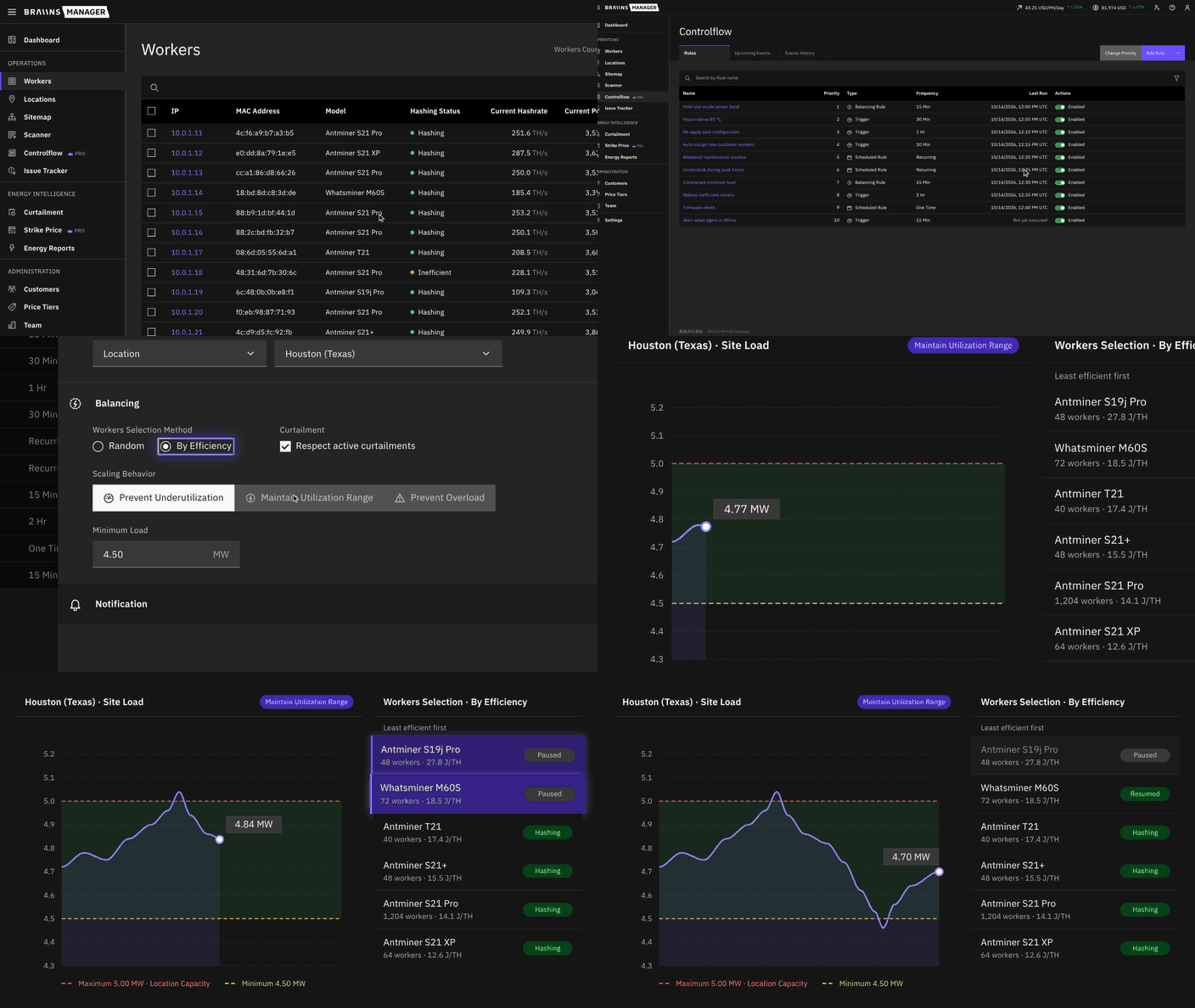
A Balancing Rule periodically watches the total power of the miners it targets: a whole location, or specific groups and racks inside it. On each check, it compares total power with your limits and adjusts the fleet if it needs to.
Each rule uses one of three scaling behaviors:
- Prevent Overload: when total power goes above the Maximum, Controlflow pauses miners until the site is back at or below it.
- Prevent Underutilization: when total power falls below the Minimum, Controlflow resumes paused miners until the site is back at or above it.
- Maintain Utilization Range: Controlflow pauses miners above the Maximum and resumes them below the Minimum. Inside the range, it does nothing.
The Maximum can be a fixed MW value or your location's capacity. When it follows the location's capacity, the rule reads the current value on every check, so a change to capacity applies from the next run.
Balancing Rules adjust miners by pausing and resuming them, so they work on stock firmware as well as Braiins OS.
Pause the Least Efficient Miners First
You choose how Controlflow picks which miners to adjust. "Random", the default, spreads pauses evenly across the site. This matters because Balancing Rules only see total power, not how your electrical equipment is wired. If your S19s and S21 XPs are in separate containers on separate transformers, pausing by efficiency would take every cut from the S19 container. One transformer would sit almost idle while the other runs at full load.
The “By Efficiency” option ranks every miner by its measured J/TH instead and when the site has to cut load, the least efficient miners are paused first. When there is room again, the most efficient miners are resumed first. In a mixed fleet, that means your older machines go offline before your newest ones, and you stay within your limit with as much hashrate as possible.
Works Alongside Curtailment
Balancing Rules respect active curtailments by default. If any miner in the rule's target is under an active curtailment, the rule skips that check and does not adjust.
This stops the two from working against each other. Without it, a rule could act on power readings from before a curtailment started and pause miners that did not need to be paused. Once the curtailment settles, the next check works from accurate numbers and makes one adjustment.
A Record of Every Run
Every check appears in Controlflow History, including checks where nothing needed to change. Open a run to see which miners it paused or resumed, and the rule's exact settings at that moment. Upcoming checks appear in the Upcoming Events calendar next to your Trigger and Scheduled rules.
Balancing Rules follow the same priority order as your other Controlflow rules. If a higher-priority rule has already adjusted a miner in a cycle, lower-priority rules leave it alone in that cycle.
Who Are Balancing Rules For?
- Sites with a grid connection limit: Set the Maximum to the location's capacity and stay under it as new miners come online or load drifts.
- Hosting providers with a fixed MW commitment: Use Maintain Utilization Range to keep the site inside the band agreed in the contract, in both directions.
- Sites with large ambient temperature swings on stock firmware: Miners without Braiins OS draw more power as ambient temperature rises, even when they aren't overheating. Set a Maximum limit and Balancing Rules will pause just enough miners to keep a warm day from pushing your site past its power limit.
Also New: Sharable Custom Filters
The Workers list now has a Filter Builder. You can now filter on measured values, not just categories.
Simply name a filter and save it to your account, and it is there on any browser or device. Share it with specific locations or your whole company so your team uses one definition of "running hot" or "underperforming". A shared filter only ever shows each person the miners they already have access to.
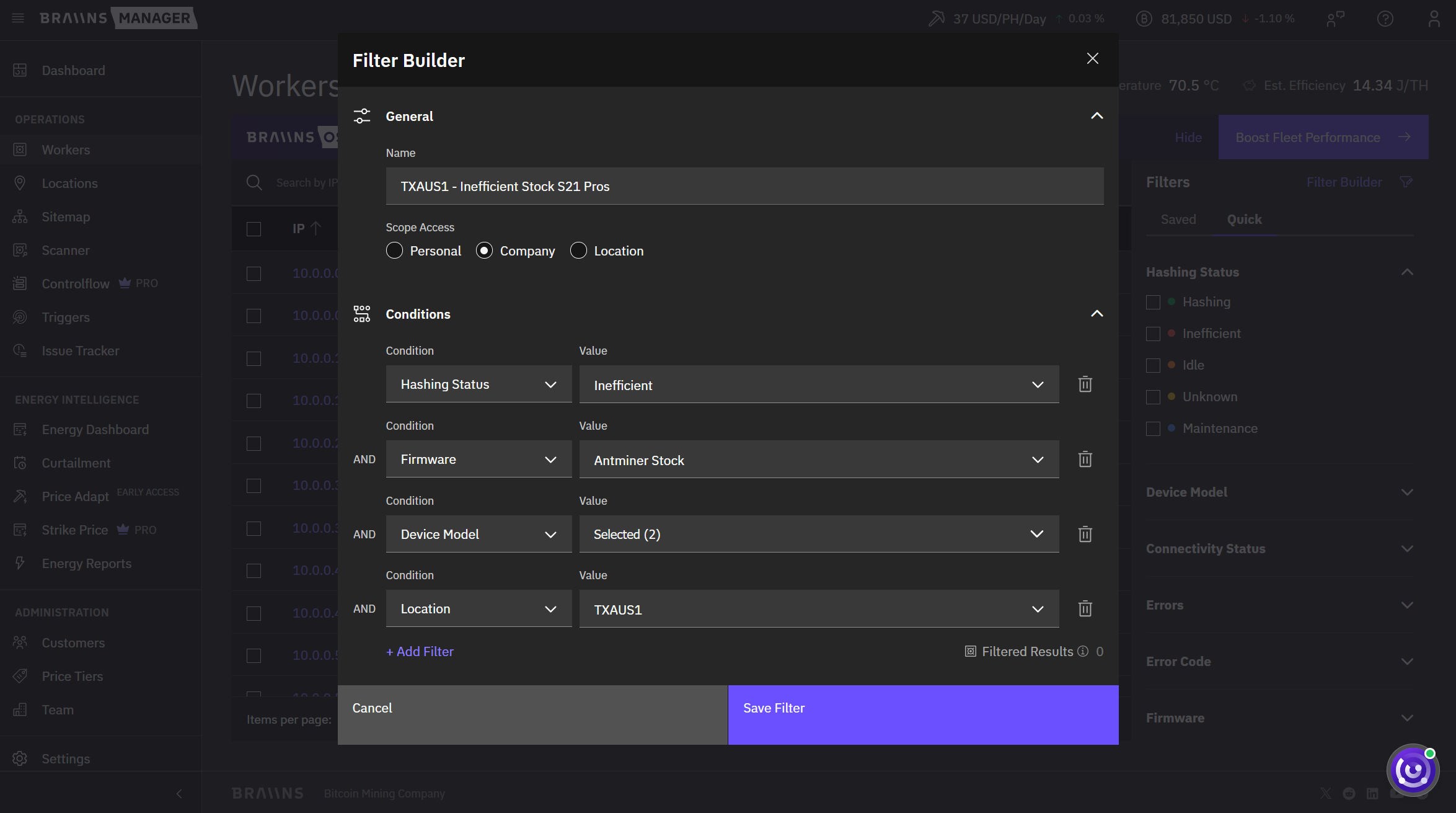
The familiar one-click categories are still there in the Quick tab, and your named filters live in the Saved tab.
Available Now in Braiins Manager
Balancing Rules are live today in Controlflow for Braiins Manager Pro. Start a free Pro trial to set up your first rule, or follow the step-by-step guide on Braiins Academy.
If you'd like to help shape the future of Braiins Manager, share feedback with our team or join the discussion in our official Telegram community.
Categories
Be the first to know!


Most Recent Articles
Hashing in 7 Days While the Miners Ship: How Sazmining Uses Braiins Hashpower Contracts
15.9.2026
Price Adapt: Automated Bitcoin Mining Profitability Optimization with Braiins Manager
20.8.2026

Enel Partnership: Introducing Energy Intelligence - Make Your Flexible Bitcoin Mining Load Pay
16.7.2026